CA C-7 License Number: 1086571

Stop Guessing. Start with a Wireless Site Survey for Reliable, High-Performing Networks.

When wireless coverage is unreliable, a wireless site survey tells you what your network actually needs.

If wireless network problems are disrupting your operations, you may already be seeing:

  • Handheld scanners dropping mid-scan
  • Employees hunting for a spot with a reliable signal
  • Pallets being received twice—or not at all
  • Cycle counts stalling because devices lose connection
  • Dock doors backing up because wireless tools aren’t working when and where they’re needed

Let’s face it, these WiFi problems cost more than frustration and stress. They slow down work, create errors, and make it harder to know whether the problem is your coverage, interference, equipment, or the physical environment.

When WiFi connectivity is business-critical, you need more than a best guess. Network Zen’s wireless site survey gurus identify what’s happening in your environment so you can make the right network decisions before investing in a solution.

Find the Wireless Site Survey Information You Need

Need quick answers?
Call us at 714-509-5744.

Or message our wireless network survey gurus using the form below.

What Is a Wireless Site Survey?

A wireless site survey, sometimes called a wireless network survey, measures how WiFi actually performs across your facility. Engineers use that data to troubleshoot existing issues, evaluate overall performance, and design coverage that holds up as the operation changes. It’s the step most vendors skip, which is why so many wireless designs are built on assumptions rather than measurements.

Warehouse and industrial environments break WiFi in ways an office never will. Steel racking reflects signal and creates dead zones that move as inventory levels change, so a network that tested clean in an empty facility fails once the racks fill. Wire mesh decking, concrete tilt-up walls, and refrigerated rooms absorb or bounce signal unpredictably. Ceiling heights of thirty feet or more change how far a mounted access point actually reaches. Motors, chargers, and older equipment throw interference onto the 2.4 GHz band. And a scanner on a moving forklift has to hand off between access points cleanly at speed, which is a different design problem than a laptop sitting still at a desk.

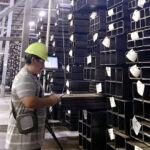
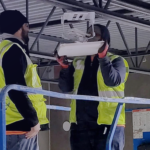
Those variables are why Network Zen’s engineers, the people our clients call our network gurus, survey on site with test radios instead of modeling from a floor plan. We measure real signal behavior against your actual racking, your actual inventory density, and the way your people and devices actually move through the space, then design from that. The same method applies whether we’re mapping an 840,000-square-foot warehouse or a single retail floor.

Watch a video of our WiFi Site Survey guru, Mike Fuerte, explain more.

Site Survey
Wireless Network Survey specialist
Network Zen WiFi
Scissor Lift

What Types of Wireless Site Surveys Are There?

Every environment is different, so the types of wireless site surveys available depend on what you’re starting with. There are several types of wireless site surveys, and choosing between them usually comes down to a short conversation about your facility and your goals.

Survey Type Best For What Happens On-Site What Our Engineers Watch For
Greenfield ("AP-on-a-Stick") Blank-canvas builds or full replacements Physical, on-site testing of every access point location; no reuse of existing gear Worth the cost when the environment is unusual: high ceilings, heavy racking, cold storage, or anything where a modeling tool's assumptions are likely to be wrong. Also the right call when the space is empty now but will fill later.
Hybrid Most common; balancing cost and accuracy On-site walkthrough plus predictive modeling; engineer designs without testing every single AP The default for most facilities. We flag obstructions, mounting constraints, and IDF locations on site, then model the rest. If the walkthrough turns up conditions we can't model confidently, we'll tell you to step up to Greenfield rather than guess.
Predictive Remote-only scenarios Floor-plan-based modeling, no site visit; accuracy depends entirely on the floor plan provided Useful for early budgeting or when a building doesn't exist yet. Ask when the floor plan was last updated. Plans that predate a racking change or a tenant improvement will produce a design that looks clean and fails in practice. * We don't recommend predictive-only surveys as the sole basis for a design. It's the faster, more inaccurate, cheaper option to sell, and we'll tell you that even when it costs us the easier sale.
Assessment Auditing a current deployment On-site testing of existing infrastructure to find remediation or expansion needs We review the wireless LAN controller or cloud dashboard configuration alongside the physical testing. A surprising share of "coverage problems" turn out to be configuration problems, and no amount of new hardware fixes those.
Validation Confirming a completed install meets spec Confirms a WLAN already in place performs as designed Worth scheduling before you sign off on a contractor's work or close out a new build. Finding a gap while the installer is still mobilized costs far less than finding it after the warehouse is live.

How do I know which wireless site survey is right for me?

In most cases, it comes down to a short conversation about your facility and your goals. New construction or a full network overhaul usually points to Greenfield or Hybrid. An existing network with connectivity issues usually calls for an Assessment. A completed install gets Validated, not resurveyed. Tell us what you’re working with, and we’ll recommend the type that fits, not the one that’s easiest to sell.

Learn more about Wireless Site Survey types in this Cisco Tech Note.

How Much Does a Wireless Site Survey Cost?

Your wireless site survey cost depends on survey type, square footage, and how many access points you’re evaluating. Rather than guess at a range here, use our Wireless Site Survey Cost Calculator below for a high-level estimate in a couple of minutes, then talk with our team for the detailed quote.

What Does a Wireless Site Survey Include?

  1. An on-site assessment conducted by a senior wireless engineer to understand your facility, business requirements, connected devices, applications, and current network challenges – test radios, not assumptions.
  2. Testing and analysis of wireless coverage, signal strength, interference, channel utilization, capacity, roaming, and other RF conditions throughout the facility.
  3. Identification of physical and environmental factors that may affect performance, including walls, building materials, equipment, neighboring networks, and other sources of interference.
  4. Recommendations for access-point locations, models, antennas, mounting heights, power settings, and other configuration requirements based on the findings.
  5. Infrastructure and installation details, including IDF destinations, mounting considerations, and expected cable runs.
  6. Custom heat maps showing predicted or measured coverage, signal strength, interference, and performance gaps across the applicable wireless bands.
  7. Engineering observations, identified risks, and prioritized recommendations for designing, improving, or validating the wireless network.

Wireless Site Survey Cost Calculator

Site surveys are an important first step for any wireless network installation. Use our cost calculator below to receive a baseline estimate on the cost of a wireless site survey from Network Zen.

22222
Please choose an option !
22222
Please choose an option !
0
Please choose an option !
0
Please choose an option !
0
Please choose an option !
0
Please choose an option !
0
Please choose an option !
0
Please choose an option !
0
Please choose an option !
0
Please choose an option !
0
Please choose an option !
0
Please choose an option !
0
Please choose an option !
0
Please choose an option !
0
Please choose an option !
0
Please choose an option !
Accurate quotes save time and money. The quote we are providing is not perfect. A conversation with our network gurus will provide you with a more accurate estimate. Submit this form to receive our high-level quote and begin a conversation with our wireless network gurus.
The price must be at least 0. Please interact with any of the choices available above.

What Happens During a Wireless Site Survey, Step by Step.

Every wireless network survey we run follows the same six steps:

  1. We define what the network has to do, zone by zone.
    Before anyone walks the floor, we document the devices in each area and what they can tolerate. Receiving, pick aisles, staging, dock doors, freezer rooms, and offices all place different demands on the network, and the requirements rarely match across them. We ask which handhelds, vehicle-mounted terminals, and tablets are in use, including model and age, because a legacy scanner with a weak antenna sets a tighter design target than a modern laptop does. If voice-directed picking or push-to-talk is in the mix, roaming and latency requirements tighten further. This step is also where we ask what’s coming: automation projects, added racking, a freezer expansion. Designing to today’s footprint alone is how facilities end up resurveying in eighteen months.
  2. We walk the facility and document what the floor plan doesn’t show.
    A floor plan tells us where the building is, not how it behaves. On site, we capture rack height and aisle geometry, inventory density and how much it fluctuates seasonally, wire mesh decking, cold storage boundaries, dock openings, and any indoor-to-outdoor transitions. We note mounting constraints and forklift exposure, existing IDF (intermediate distribution frame) locations, cable pathways, and PoE (Power over Ethernet) capacity, since the best RF location is worthless if there’s no practical way to power and cable it.
  3. We measure the RF environment, passively and actively.
    A passive survey listens to the environment and maps how signal actually propagates, including interference from sources that have nothing to do with WiFi: motors, chargers, and older equipment sitting on the 2.4 GHz band. An active survey connects to the network and measures what a user actually experiences, including throughput, latency, packet loss, and roaming behavior. On greenfield and hybrid engagements we stage test access points at real deployment height, then survey outward to find the true cell edge rather than assuming a spacing chart is right.
  4. We test at working height, against your actual devices.
    Coverage measured at head height in an open aisle is not coverage where the work happens. We measure at the height and location scanners actually operate, and we test roaming along real travel paths, since long aisles and zone transitions are where scanners tend to cling to a distant access point instead of handing off cleanly. Where possible we validate against the specific device models in your fleet rather than survey hardware alone, because survey adapters routinely read several decibels stronger than a handheld does.
  5. We build the design and the documentation.
    You get a heat map covering the relevant bands, an access point placement map, and an AP detail listing with type, antenna, mounting height and method, IDF assignments, and anticipated cable lengths. Alongside the coverage maps, you get signal-to-noise findings, interference notes, and identified risk areas, since a clean coverage map on its own doesn’t prove the network will hold up under load.
  6. We walk you through findings and what to do about them.
    We present what we measured, where the risks are, what we recommend, and what it will take to get there, including any mounting, cabling, or PoE work the design depends on. If remediation of your existing network is the right answer rather than new hardware, we’ll say so. Design and installation are available as a next step, and the same engineers who surveyed carry it through.

What are wireless heat maps?

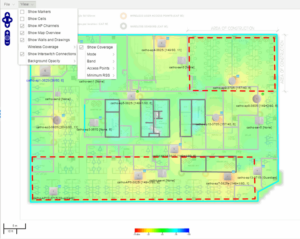
A heat map is a visual read of signal strength across your facility; usually, warmer colors mark strong coverage, cooler colors mark the dead zones, so problems are visible before they show up as complaints. It’s the same signal-mapping approach HPE Aruba Networking’s documentation describes for reading a wireless environment.

Access Point Wi-Fi Coverage Map

Why Choose Network Zen for Your Wireless Site Survey?

C-7 Low Voltage Systems Contractor License #1086571 through the California CSLB verify it yourself at cslb.ca.gov before you award the work.

  • Fast & Efficient Team: A site survey for iDC Logistics in their 840,00 sq. ft. warehouse was completed in 3.5 weeks instead of the 5-6 originally estimated.
  • Experience in Volume & Complexity: 2M+ sq. ft. of wireless deployments across 8 healthcare facilities among many other large multi-site projects. 
  • Expertise in Many Environments: Low-voltage and WiFi survey work completed for Chanel and 23 Sketchers retail locations along with warehouses, distribution centers, healthcare, large venue, and other environments. 
  • Accessible Teams: One dedicated point-of-contact engineer, reachable by phone, email, or text, not a ticket queue

Common Questions About Wireless Site Surveys

Do I need a new survey if my facility hasn't changed much?

If your layout, device count, or how inventory moves through the space has shifted at all since your last survey, a fresh one is usually still worth it. A wireless design is built around exactly how your people, inventory, and devices move through the space at the time of the survey. Even a modest layout change, added shelving, a new device fleet, more foot traffic, can shift where signal actually needs to reach, which the original survey never accounted for.

A competitor already gave us a free wireless design with a different access point count. Why should we trust yours?

Most competitors size access points off manufacturer distance charts without ever surveying the space. Our number comes from on-site testing of your actual environment, not a chart.

I just need to add a few access points. Do I still need a full survey?

Usually a smaller one, yes. Placement for supplemental APs still depends on testing the space; skipping that step is where we see the most configuration and connectivity issues later.

How long does a wireless site survey take?

It varies with facility size and survey type. We'll give you a specific timeline after the initial call.

Extreme Networks
Juniper Networks
Graybar
ALE logo 300x90

More Wireless Network Solutions

network design icon

Wireless Network
Design

Whether you’re looking for a new facility build-out or realizing your current network isn’t meeting your needs, Network Zen is here to help with your network design needs.

high-five icon

Wireless Network
Installation

Network installation by the “other guys’“ will leave you hanging. At Network Zen, people come first, and that means our customers and their needs come first.

Network Monitoring Security icon

Network Monitoring
& Security

Network monitoring and security from Network Zen ensures your business runs smoothly with our uptime guarantee and end-to-end security visibility.

Types of Wireless Site Survey

What makes us who we are?

Dedicated and accessible point of contact engineer.

When you work with Network Zen your single-point-of-contact will be one of our engineering gurus, who you can contact by phone, email, or text. It’s our way of saying that we value your time as much as we do our own!

Small but nimble with Fortune 500 resources.

We believe personalized attention matters. That’s why we stay lean and focused, cutting out unnecessary rules and costs. You’ll still get the same Fortune 500 resources as the big firms, just delivered more efficiently.

One-stop, specialized expertise for your entire network needs.

Our seasoned engineering gurus can design, implement, support, and repair mobility, wireless, server, desktop, firewall, and switch issues from leading manufacturers and in all environments.

Testimonials

What our Clients say About us

One Step, Fewer Problems Later

That’s the difference between a network built on an actual wireless network survey and one built on a guess. A wireless site survey isn’t an extra step before the real work starts; it’s the part of the job that decides whether the rest of it holds up. Skip it, and you’re paying for access points placed on a guess. Do it right, and every decision after, coverage, hardware, cost, is based on how your space actually behaves. That’s the difference between a network that works on day one and one you’re still troubleshooting a year later.

This overview covers wireless site surveys for existing commercial facilities such as warehouses, healthcare buildings, retail locations, and large venues. If you’re planning new construction, our team can advise during design, but the survey process described here applies to a built environment.

Before you add more access points, survey the environment. Get a free, no-obligation estimate from Network Zen's wireless site survey gurus.

Michael Mabini, founder and CEO of Network Zen

Page Author

Michael Mabini is the founder, President, and CEO of Network Zen

Michael Mabini built Network Zen from the ground up starting in Brea, California. With nearly two decades in the IT industry, Michael holds an extensive list of wireless and networking certifications, including credentials from Cisco, Aruba, Extreme Networks, and Ekahau, and is widely regarded by clients and colleagues as one of the most knowledgeable voices in wireless technology working today. Under his leadership, Network Zen has grown into a recognized name in wireless site surveys and network design for warehouses, healthcare facilities, and retail environments, earning a spot on the Inc. 5000 list of fastest-growing private companies. Michael's approach favors testing over guesswork: surveying real environments with real equipment rather than relying on assumptions, a philosophy that shapes how his team approaches every project. Outside of work, he and his wife Vanessa founded the Network Zen Foundation, a nonprofit that provides technology and wireless resources to schools and children who need it most.